
OpenAI, a continuous innovator in the field of artificial intelligence, is once again leading the charge. On October 21, 2025, they officially unveiled ChatGPT Atlas, a groundbreaking product designed to fundamentally rethink how we use the web.
ChatGPT Atlas is not just an ordinary browser, nor is it merely a new feature within ChatGPT. It is a brand-new web browser with ChatGPT's core capabilities deeply embedded within it. It seamlessly integrates the understanding, memory, and agency of AI into every single online interaction you have. OpenAI states that their vision for ChatGPT Atlas is to become a "super-assistant" that understands your world and helps you achieve your goals, moving beyond the confines of a traditional chat tool.
This article will guide you through the core functionalities of ChatGPT Atlas, how it aims to realize the vision of "AI accompanying you everywhere on the web", and its potential profound impact on our future digital lives.
What Exactly Is ChatGPT Atlas? – How AI Reshapes the Browser
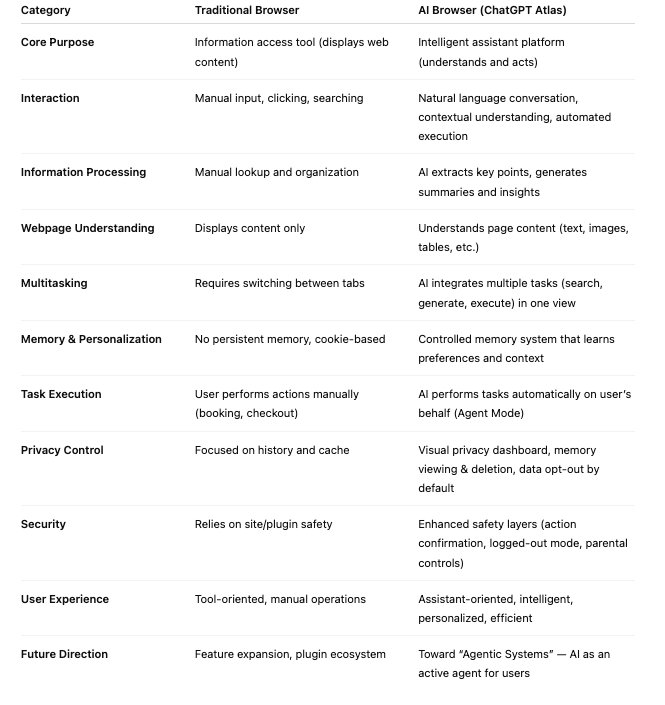
The advent of ChatGPT Atlas signifies a deep integration of AI with the traditional web browsing experience. It is a brand-new web browser with ChatGPT's core capabilities deeply embedded within it. Transcending the role of traditional browsers as mere information gateways, it weaves the AI's understanding, memory, and agency into every single one of your online interactions.
OpenAI observed that ChatGPT's search feature has been incredibly popular since its introduction last year, indicating that users desire more intelligent and efficient AI assistance when browsing the web. The browser, being "where all of your work, tools, and context come together," ought to possess a more profound AI integration. Thus, ChatGPT Atlas was born, with the objective of creating a true super-assistant, rather than just a standalone chat tool.
ChatGPT Atlas fundamentally differs from traditional browsers: it no longer merely provides search results but is instead capable of understanding what you are trying to do, what content you are viewing, and completing tasks for you directly within the same window, completely eliminating the tediousness of copying and pasting or switching pages.
Core Features and Revolutionary Highlights of ChatGPT Atlas
ChatGPT Atlas introduces several revolutionary features designed to make your web experience unprecedentedly intelligent and efficient:
- Built-in ChatGPT Memory:
- Function: One of the core advantages of ChatGPT Atlas lies in its built-in ChatGPT memory. It can automatically draw upon your past ChatGPT conversations and details to provide rich context and assistance for current tasks.
- Benefit: This means the AI understands your long-term needs, preferences, and habits more deeply. You don't need to repeatedly provide background information; the AI can offer more precise and personalized assistance.
- Instant Contextual Understanding of Webpages:
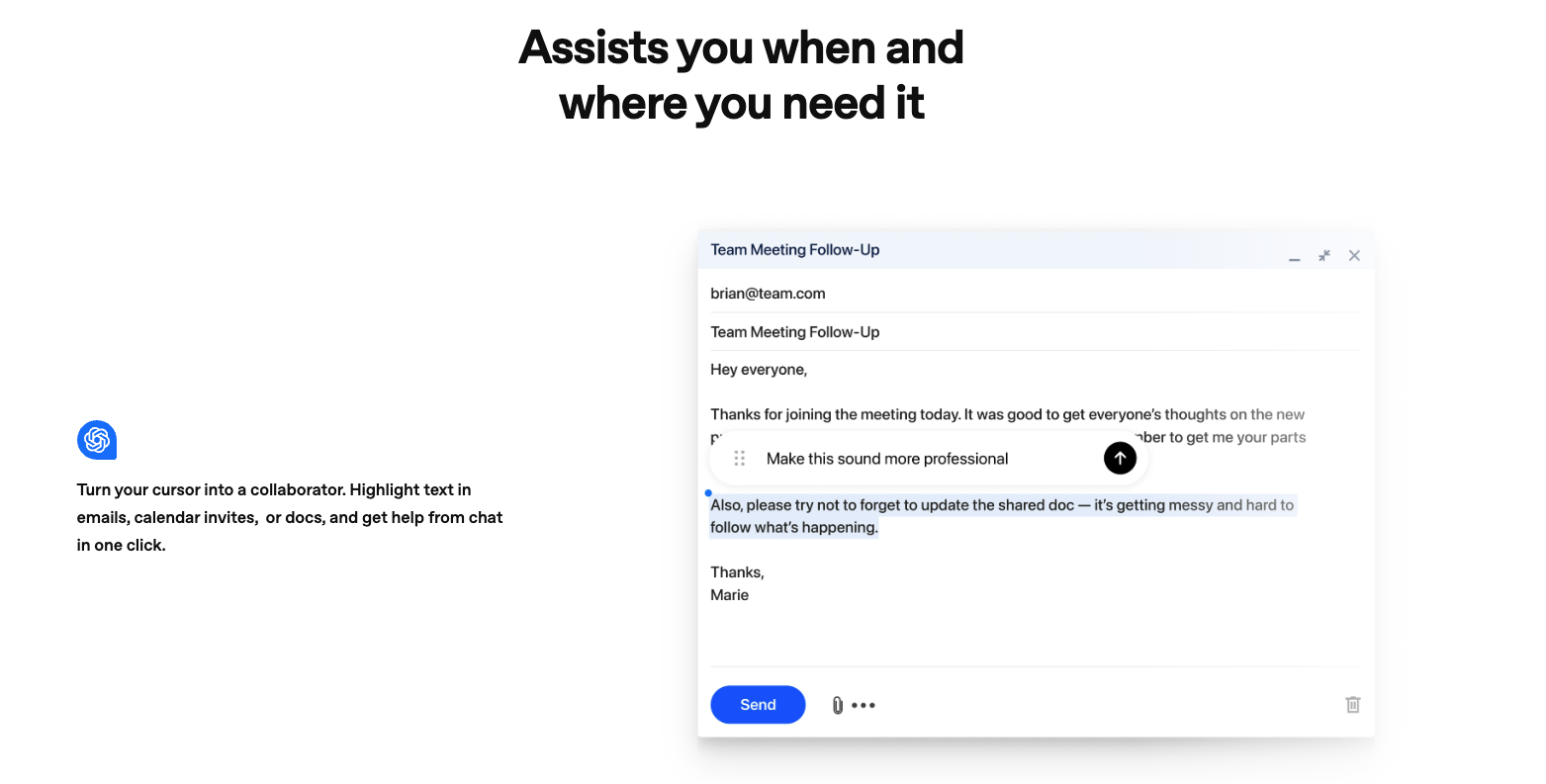
- Function: This is a groundbreaking feature of Atlas. ChatGPT can instantly "see" and comprehend the content of the webpage you are browsing, whether it's an article, slides, or images, much like having an intelligent co-pilot by your side.
- Benefit: For instance, early tester Yogya Kalra, a college student, mentioned that while studying, he used to switch between slides and ChatGPT, taking screenshots just to ask a question. Now, ChatGPT instantly understands what he's looking at, helping him with knowledge checks as he goes.
- Browser Memories:
- Function: This is an optional feature that allows ChatGPT to remember the context of websites you've visited for subsequent conversations and tasks.
- Benefit: For example, you can ask ChatGPT, "Find all the job postings I was looking at last week and create a summary of industry trends so I can prepare for interviews."
- User Control: OpenAI specifically emphasizes that Browser Memories are completely optional, and users have absolute control. You can view or archive these memories at any time in settings, and deleting browsing history deletes any associated browser memories.
- Powerful Agent Mode:
- Function: This is one of the most compelling features of ChatGPT Atlas. ChatGPT can directly execute tasks for users within the browser, enabling high levels of automation.
- Example Use Cases:
- Research and Analysis: Quickly gather information, read through past team documents, perform new competitive research, and compile insights into a team brief.
- Automated Tasks: When planning a dinner party, you can give ChatGPT a recipe and ask it to find a grocery store, add all ingredients to a cart, and order them to your house.
- Booking and Planning: Plan events, book appointments, etc.
- Usage: You can request the AI to perform tasks through natural language conversations, or by clicking the agent mode button.
- Availability: Agent mode is currently available in preview for Plus, Pro, and Business users, with continuous improvements planned for reliability, latency, and success rates for complex tasks.
Safety and Control: User Safeguards in ChatGPT Atlas
OpenAI has prioritized safety in building the agent capabilities of ChatGPT Atlas, implementing multiple safeguards to address new risks arising from AI accessing logged-in sites and browsing history while taking actions on behalf of users.
- Strict Action Restrictions: ChatGPT in Atlas cannot run code in the browser, download files, install extensions, or access other applications or the file system on your computer.
- Sensitive Operation Confirmation: When the AI needs to perform actions on specific sensitive sites such as financial institutions, it will pause to ensure you are watching and confirming its actions.
- Logged Out Mode: Users can choose to use the agent in logged-out mode, which can limit its access to sensitive data and reduce the risk of it taking actions as you on websites.
- Privacy Controls:
- Browser Memories are completely optional and controllable; users can view, archive, and delete them at any time.
- Website Visibility Toggle: In the address bar, users can always decide which sites ChatGPT can or cannot see the content of. When visibility is off, ChatGPT cannot view page content, and no memories are created from it.
- Data Training Choices: By default, OpenAI does not use the content you browse to train its models. Training is only enabled if you choose to opt-in through your data controls settings by enabling "include web browsing."
- Parental Controls: Atlas introduces new parental control features, including the option for parents to turn off browser memories and agent mode, offering more protection for family users.
Despite these safeguards, OpenAI acknowledges that AI agent capabilities still carry risks, such as making mistakes or being susceptible to malicious instructions. They have invested thousands of hours in focused red-teaming and emphasize continuous monitoring and patching of any vulnerabilities, while also reminding users to weigh the tradeoffs and take steps (such as using agent in logged-out mode and monitoring agent's activities) to minimize risks.
How ChatGPT Atlas Reshapes the Future of the Web?
ChatGPT Atlas is not just a new browser; it represents a new paradigm in the integration of AI with the web experience, foreshadowing an AI-driven, smarter, and more efficient digital future.
- Realizing the "Super-Assistant" Vision: It deeply integrates AI from being a standalone tool into the web's most frequently used entry point, enabling seamless assistance and making AI your true "web super-assistant."
- Leap in Efficiency and Personalization: It significantly enhances the efficiency of information processing and task completion, providing a highly personalized web experience tailored to your habits and needs.
- The Dawn of Agentic Systems: OpenAI believes this launch marks a crucial step towards a future of "Agentic Systems," where users can delegate routine and repetitive tasks to AI, thereby focusing more on what truly matters and requires human creative thought.
- Future Outlook: OpenAI's roadmap includes multi-profile support, improved developer tools, and ways Apps SDK developers can increase the discoverability of their apps in Atlas. Website owners can also add ARIA tags to improve how ChatGPT agent works for their websites in Atlas.
ChatGPT Atlas is another milestone innovation from OpenAI in the field of AI. It redefines our relationship with the web, bringing powerful AI capabilities directly into your every browse and action. This is not merely a browser upgrade; it is a fundamental transformation of how we interact with the digital world.